UK estimating workbook · Q3 2026 edition

Price the job properly. Then prove the number.

Every estimating template you have downloaded was built for someone in Ohio. Dollars, square feet, no VAT, no CIS, no idea that Central London costs 38% more than Liverpool. Ratebook is 176 UK rates, 622 live formulas and a benchmark check that tells you whether your price is sane before you send it.

  • 9 sheets
  • 176 UK rates
  • 27 regional multipliers
  • Excel · no macros

One payment · instant download · free updates to the 2026 edition

Live worked example
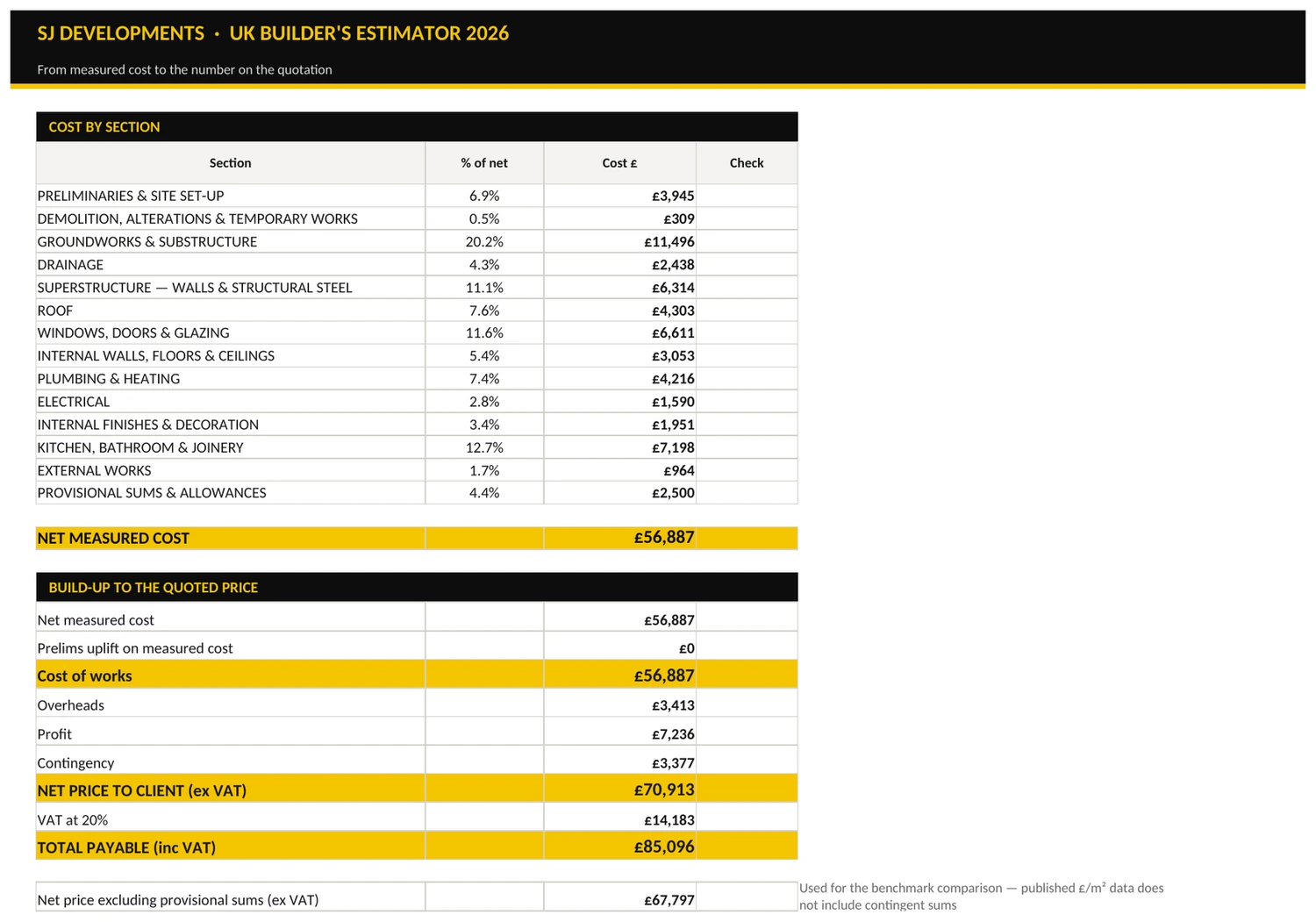
UK-Builders-Estimator-2026.xlsx — Summary
The Summary sheet showing cost by section and the full build-up from measured cost to the total payable including VAT.
Benchmark Check
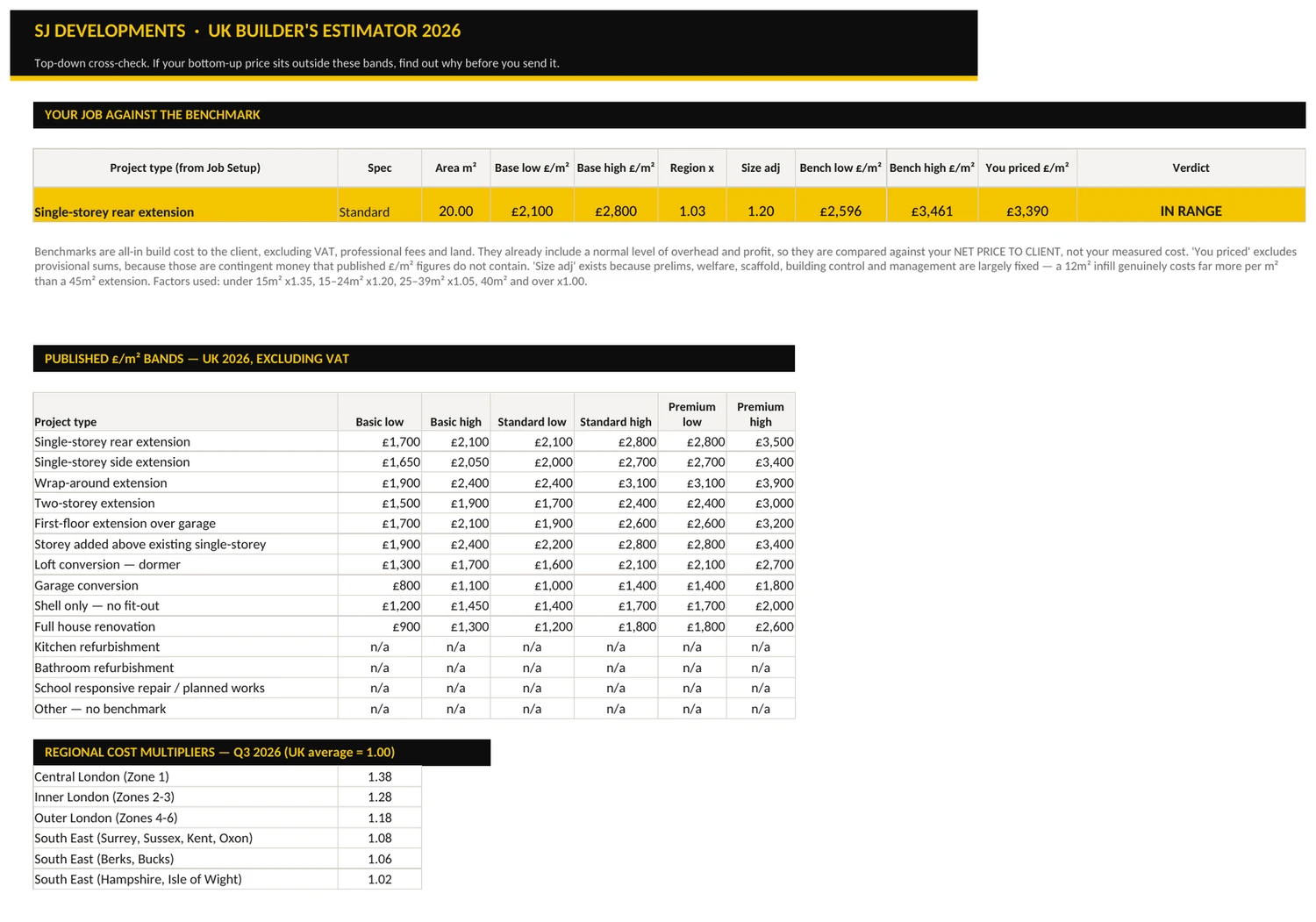
The Benchmark Check sheet returning an IN RANGE verdict against published cost per square metre bands.
176
UK rates, Q3 2026, excluding VAT — low, average and high
622
Live formulas, checked to zero errors before release
27
Regional multipliers, from 1.00 UK average to 1.38 Central London
18
Paste-ready exclusion clauses for your quotations

The problem

Free templates are free for a reason.

There are hundreds of construction estimating spreadsheets online. Nearly all of them are American, and none of them know anything about how a UK job actually gets priced.

01

Wrong currency, wrong units

Dollars and square feet. You spend an evening converting before you can price a single job, and every conversion is a chance to be out by a factor of ten.

02

No VAT logic at all

A US template has no concept of 20%, 5% for a two-year empty property, or zero-rated new build. So you bolt VAT on at the end and hope you picked the right rate.

03

No CIS, no regional variance

Nothing deducts 20% from a subcontractor's labour element. Nothing knows a job in Chester and the same job in Kensington are not the same job.

What is inside

Nine sheets. No filler.

Scroll through the workbook. Every screen here is the actual file, not a mock-up.

  • 01 Start Here

    How to drive it, in plain English, in about four minutes. Colour key, workflow, and what the file does and does not do.

  • 02 Job Setup

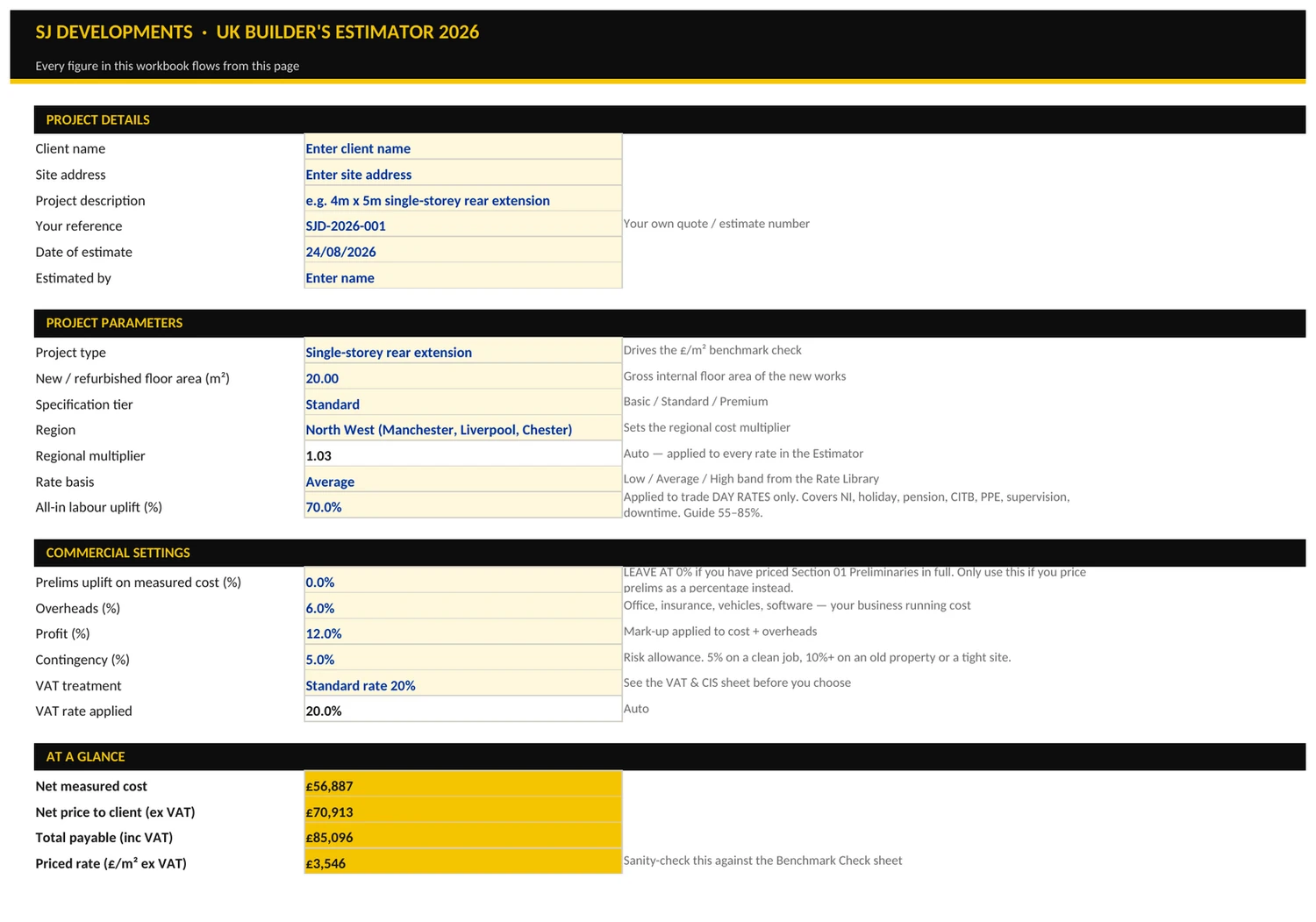
    One screen. Project type, floor area, spec tier, region, labour uplift, overheads, profit, contingency, VAT treatment. Change the region and all 176 rates reprice.

  • 03 Rate Library

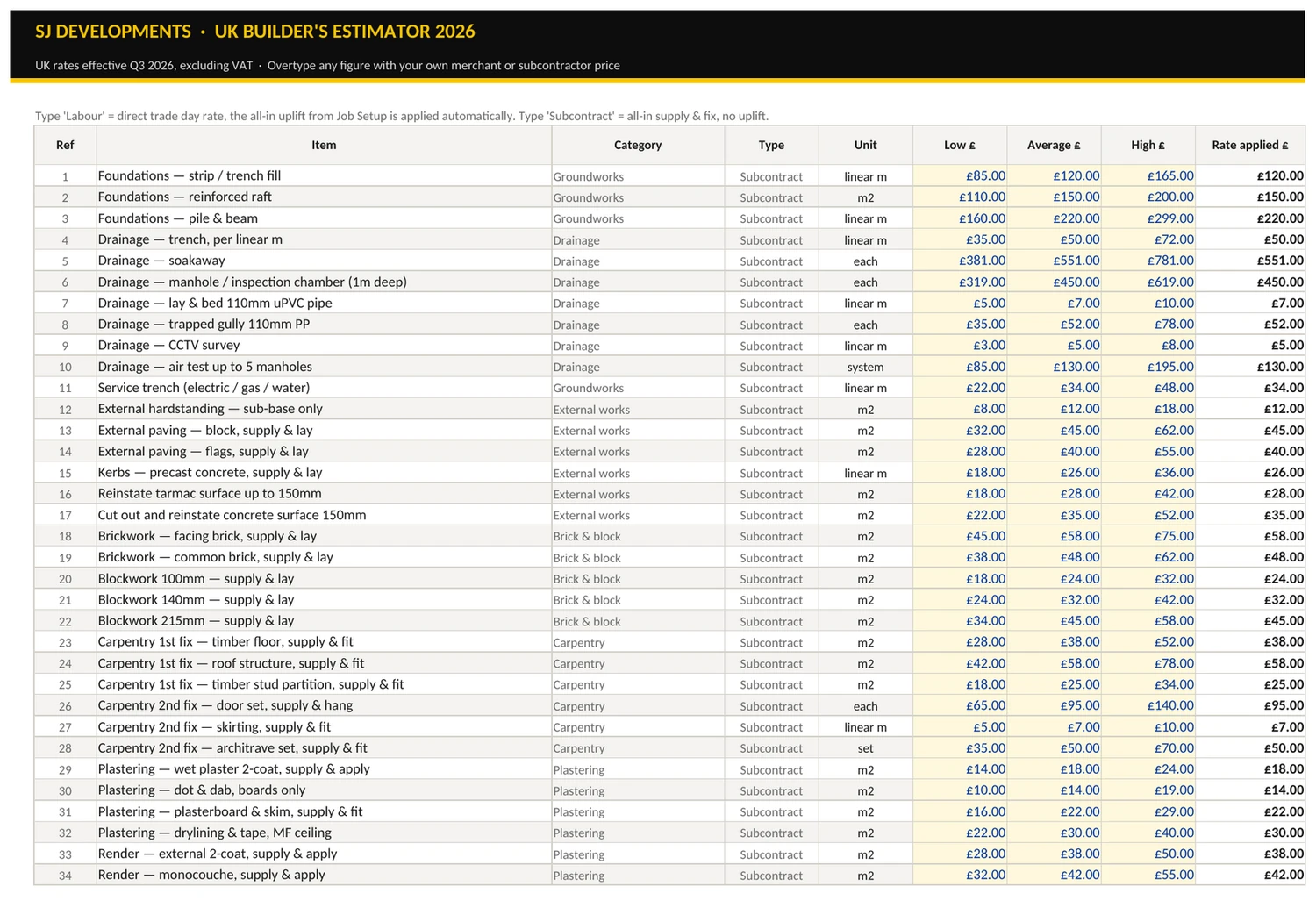
    176 rates across subcontract measured work, trade day rates, materials and plant. Low, average and high for every line. Overtype any of them — it becomes your library after the first job.

  • 04 Estimator

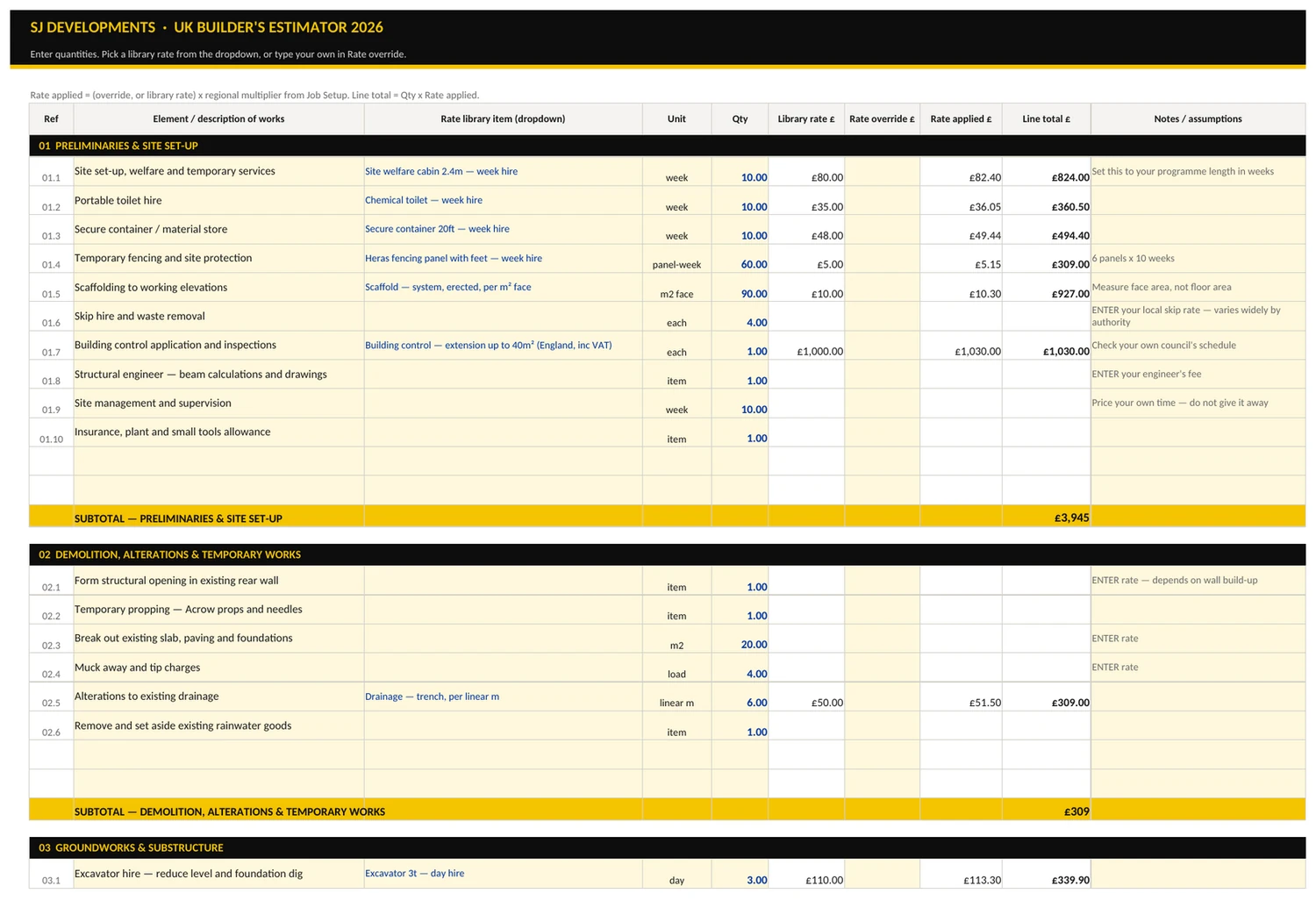
    14 sections, preliminaries through to provisional sums. Pick a rate from the dropdown or type your own. Your override always wins and is never touched by the regional factor.

  • 05 Summary

    Cost by section, then the full build-up to the quoted price. Gross margin, mark-up and £/m² priced, calculated for you rather than guessed at.

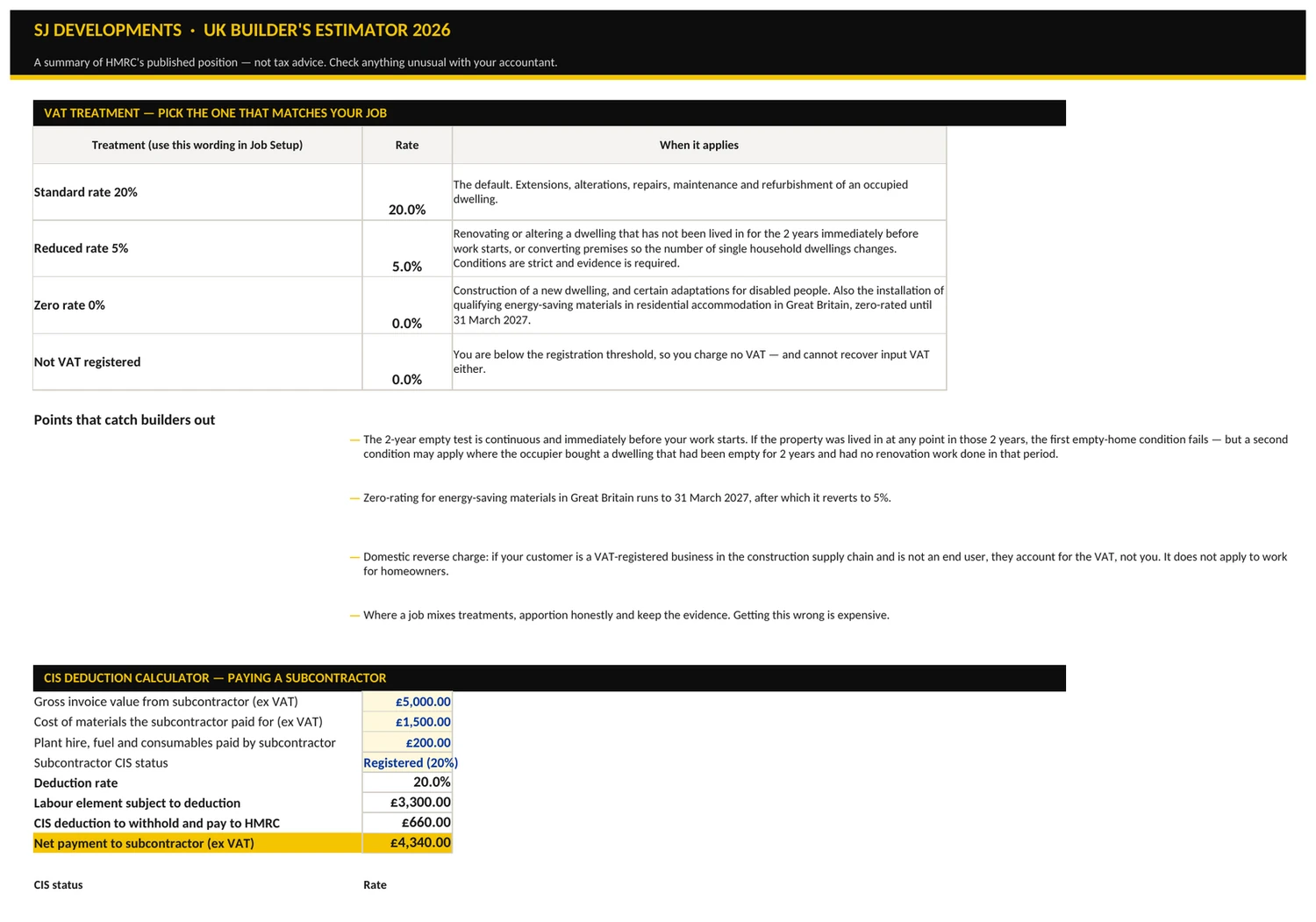
  • 06 VAT & CIS

    Four VAT treatments with HMRC's actual conditions written beside each. Plus a CIS calculator that strips materials, plant and fuel before applying 0%, 20% or 30%.

  • 07 Benchmark Check

    Published £/m² bands for 14 project types across three spec tiers, adjusted for region and job size, with a live verdict on your number. Nothing else at this price does this.

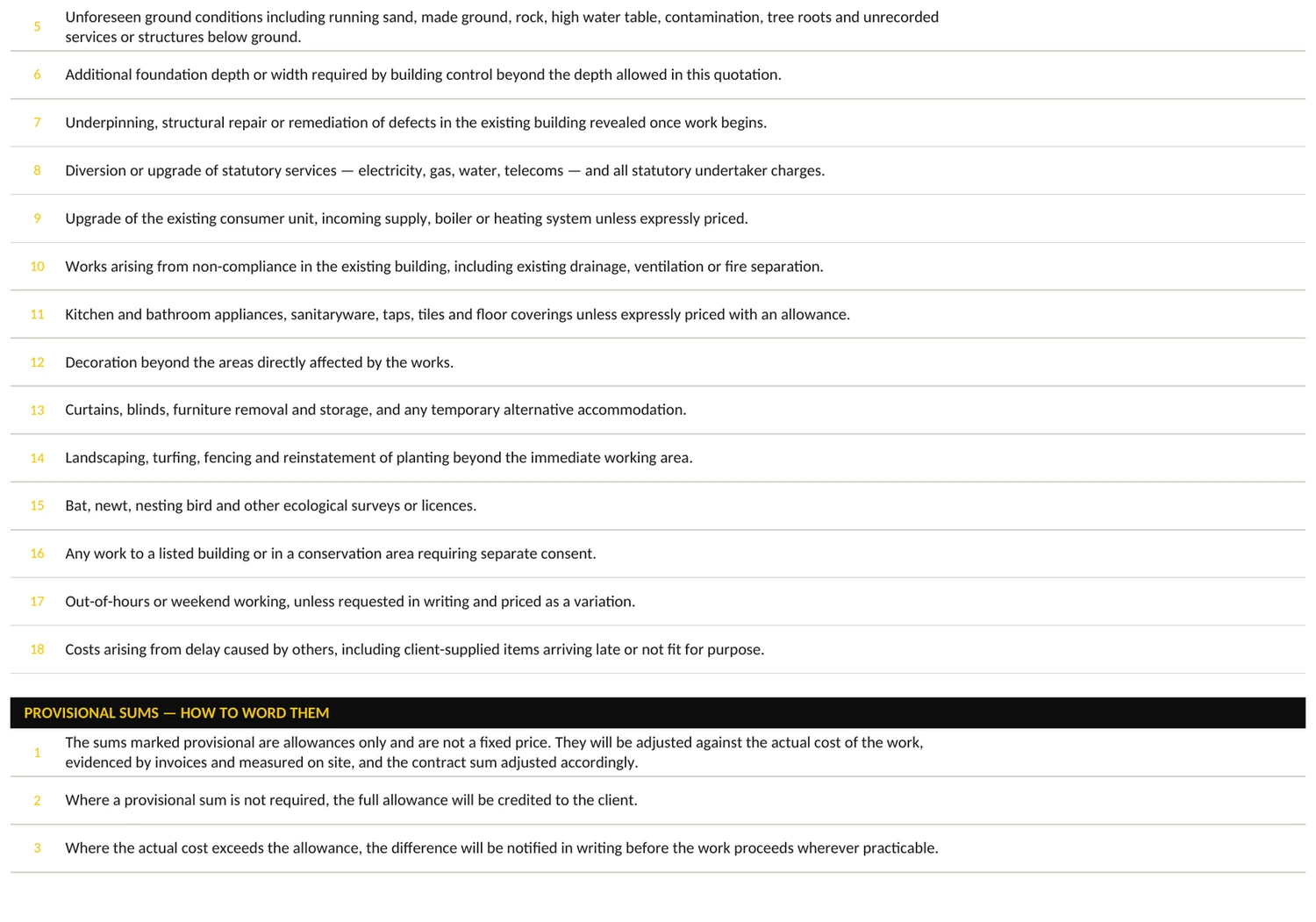
  • 08 Scope & Exclusions

    9 inclusions and 18 exclusions written as finished clauses. Asbestos, party wall, planning fees, unforeseen ground conditions. Paste straight into a quotation.

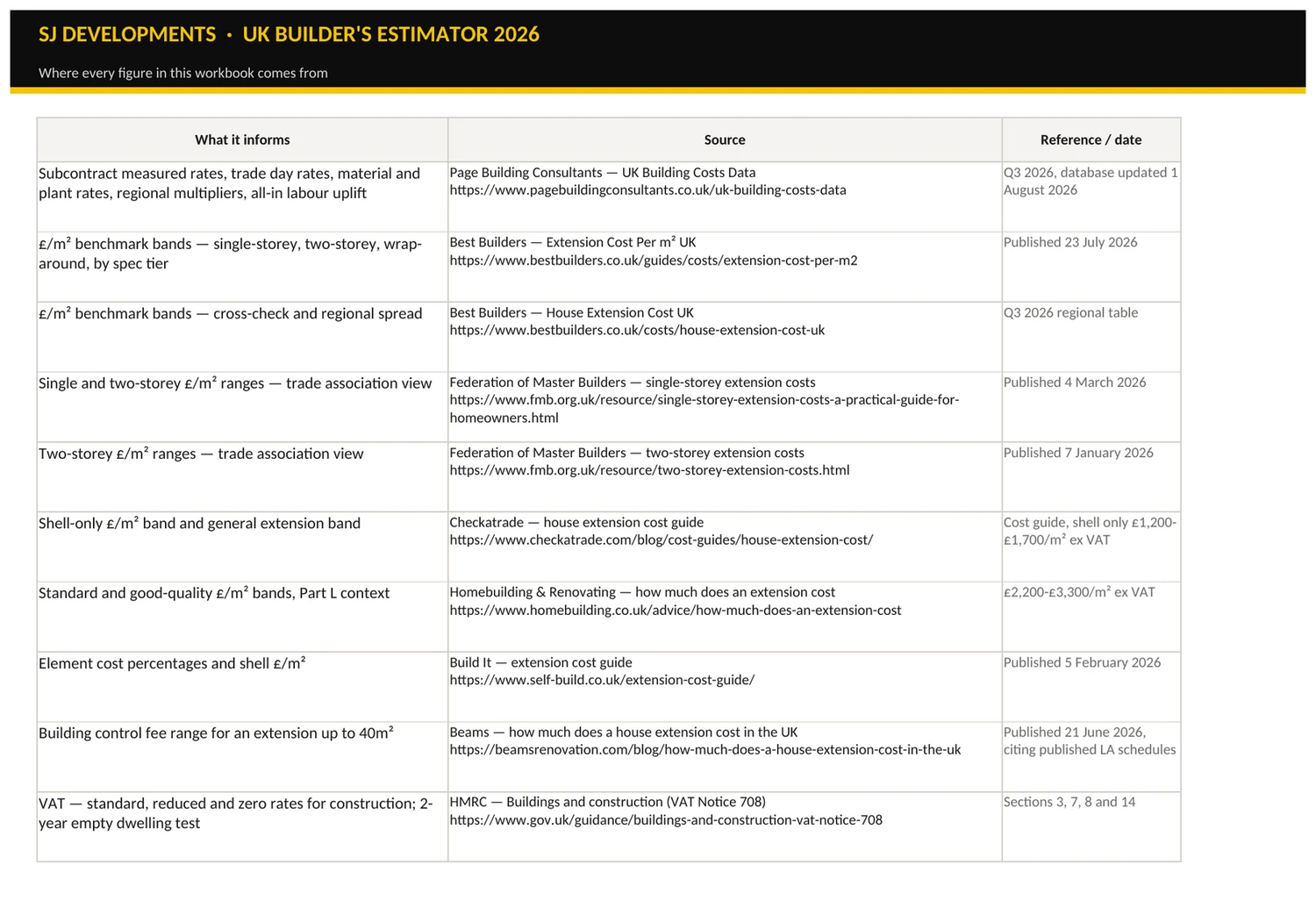
  • 09 Sources

    Every rate source and every piece of HMRC guidance, with links, so you can check the working yourself instead of taking my word for it.

01 / 09 The Start Here sheet. The Job Setup sheet. The Rate Library sheet. The Estimator sheet. The Summary sheet. The VAT and CIS sheet. The Benchmark Check sheet. The Scope and Exclusions sheet. The Sources sheet.

Worked example

A real 20 m² extension, priced line by line.

Single-storey rear extension, North West, standard specification. This example ships filled in, so you see a finished job the moment you open the file.

01
Net measured cost 14 sections, regional multiplier 1.03, size adjustment 1.20
£56,887
02
Overheads6% of cost of works
£3,413
03
Profit12% on cost plus overheads
£7,236
04
Contingency5%, adjustable
£3,377
05
Net price before VAT
£70,913
06
VAT20% standard rate — extension to an occupied dwelling
£14,183
07
Total payable
£85,096
Priced £/m²
£3,390
Benchmark band
£2,596–3,461
Verdict
IN RANGE
Gross margin
19.8%
Mark-up
24.7%

The £/m² comparison deliberately excludes provisional sums, because benchmark data covers the building work and not the client's undecided kitchen. Small jobs also genuinely cost more per square metre — prelims, welfare, scaffold, building control and management barely scale with area — so the file applies a size adjustment of ×1.35 under 15 m², ×1.20 for 15–24 m², ×1.05 for 25–39 m² and ×1.00 above 40 m². Getting that wrong is why most spreadsheets tell you a 20 m² extension looks expensive when it is priced correctly.

The bit that quietly ruins jobs

A day rate is not what a day costs you.

Most templates let you type £220 for a bricklayer and treat it as your cost. It is not. Everything below sits on top of it, and if you do not add it you are working for nothing while your spreadsheet tells you the job is profitable.

  • Employer's National Insurance on every hour you pay for
  • Holiday pay, pension, CITB levy, PPE and the rest of the on-costs
  • Non-productive time — travel, setting up, waiting on a delivery that did not turn up
  • Applied to labour rows only. Subcontract measured rates are already supply and fix, so uplifting them would double-count

Ratebook applies an all-in uplift of 70% by default, tagged per row, and you can change the figure in one cell.

The Rate Library sheet, showing low, average and high rates with each row tagged by type.

Tax, done properly

VAT and CIS, referenced to the guidance.

Not a dropdown with four percentages in it. Each treatment has HMRC's actual test written beside it, and every rule is cited on the Sources sheet so you can check it.

  • 20% standard — extensions and alterations to an occupied dwelling (VAT Notice 708)
  • 5% reduced — where a dwelling has not been lived in for the continuous two years immediately before work starts, or where the number of dwellings changes
  • 0% — new dwellings, qualifying disabled adaptations, and energy-saving materials in Great Britain until 31 March 2027, reverting to 5% from 1 April 2027 (Notice 708/6)
  • CIS at 0%, 20% or 30% applied to the labour element only — materials, consumables, fuel and plant the subcontractor paid for are excluded (CIS 340)
The VAT and CIS sheet showing the four VAT treatments and the CIS deduction calculator.

Where it sits

It is not Spon’s.
It is not meant to be.

Spon's has 20,000 prices and is the industry standard. Ratebook has 176. What Ratebook does is add your job up, work out your tax, and check its own answer — for the price of a bag of plaster.

Swipe the table sideways →

  Ratebook 2026 Spon's 2026 EstimatorXpress Free US template
Price £29 once £161 print, £275 for 5 electronic licences From £899 + VAT per year Free
Renewal None New edition annually Annual, plus £29.99/mo support None
Number of rates 176 20,000 Thousands Whatever you type in
Adds your job up for you Yes No — it is a book of prices Yes Partly
UK VAT treatments Four, with HMRC conditions Reference only Yes None
CIS deduction calculator Yes, labour element only Reference only Yes None
Regional multipliers 27, applied automatically Yes, applied by hand Yes None
Checks your price against benchmarks Yes, live verdict No No No
Paste-ready exclusion clauses 18 No Within templates No
You can edit every rate Yes, it is a spreadsheet No Within the software Yes
Learning curve About four minutes None, but you do the maths Days Rebuild it first

Prices checked 24 August 2026. Spon's Architects' and Builders' Price Book 2026 is the 151st edition, compiled by AECOM, containing 20,000 prices — Routledge; £275.00 for the five-licence electronic format at BSRIA, best print price £161.11 at PriceSpy UK. EstimatorXpress Essential is £899 + VAT annually or £1,599 + VAT perpetual, with Support & Updates at £29.99 per month — EstimatorXpress and HBXL. Ratebook is an independent product and is not affiliated with, endorsed by, or derived from any of them.

Straight answer

Who this is for, and who it is not.

Buy it if

  • You price extensions, renovations, kitchens, bathrooms, lofts or garage conversions
  • Your jobs sit roughly between £5,000 and £250,000
  • You currently price on the back of a notepad or in a spreadsheet you built yourself
  • You have ever won a job and then wondered why it made no money
  • You do school or commercial responsive and planned works and need defensible rates
  • You want to own the file, not rent access to it

Do not buy it if

  • You need NRM2-compliant bills of quantities
  • You run new-build housing schemes or anything over about £1m
  • You already run EstimatorXpress or Causeway properly and it works for you
  • You want live, feed-updated material prices — these are Q3 2026 published rates
  • You expect it to price without you checking a single rate against your own suppliers
  • You want tax advice — it cites HMRC guidance, it does not replace your accountant

Who built it

Built by a builder, not a template farm.

Ratebook was built by SJ Developments North West Ltd, a working construction company in Liverpool doing extensions, renovations, kitchens and bathrooms, plus planned and responsive works for local schools. It exists because the tools available were either a book, a £900-a-year subscription, or an American spreadsheet.

This is the launch edition. There are no customer reviews on this page because there are no customers yet — I am not going to invent any. What you can check instead is on the right, and every rate source and tax reference is listed inside the file.

Verifiable details
Company SJ Developments North West Ltd
Company no. 16371408
VAT no. 495867810
Based Liverpool, England
Contact sj_developments@outlook.com
Rate source Published UK cost data, Q3 2026

Questions

Before you buy a £29 spreadsheet.

Where do the rates come from?
Published UK building cost data for Q3 2026, principally Page Building Consultants' UK building costs data, cross-checked against extension cost guidance from the Federation of Master Builders, Checkatrade and Homebuilding & Renovating. Every source is listed with its link on the Sources sheet. They are indicative market rates, not a quotation — check them against your own suppliers.
Will it work in Google Sheets or LibreOffice?
LibreOffice Calc handles it properly. Google Sheets will open and calculate it, but the data-validation dropdowns and the cost-by-section chart are less reliable there. Excel 2016 or later, or Microsoft 365, is what it was built and tested in. There are no macros, so nothing to enable and nothing for your IT policy to block.
Can I put my own rates in?
That is the point. Every rate in the library is overtypable, and every line on the Estimator accepts a manual override that always beats the library figure and is never multiplied by the regional factor. After one real job it stops being my rate library and becomes yours.
Why 176 rates and not thousands?
Because 176 covers the work most small builders actually do, and a library of 20,000 is unusable in a spreadsheet. If you need 20,000, buy Spon's — it is genuinely excellent and this does not replace it. Ratebook is built to get you from a blank page to a defensible number in under an hour.
How does the benchmark check actually work?
It holds published £/m² bands for 14 project types across three specification tiers, adjusts them by your region's multiplier and by a size factor, then compares that band to your own priced £/m² excluding provisional sums. It returns LOW, IN RANGE or HIGH. It is a sanity check on your arithmetic and your assumptions, not a valuation.
Is this tax advice?
No. The VAT and CIS sheet quotes and links HMRC's own guidance — Notice 708, Notice 708/6 and CIS 340 — so you can see which rule a figure comes from. Confirm your position with your accountant or HMRC before you rely on it.
Are there any reviews?
Not yet. This is the launch edition and it has not been sold before, so there is nothing honest to put here. Rather than manufacture testimonials, every sheet in the workbook is screenshotted further up this page and the worked example shows the real output, so you can judge exactly what you are buying before you pay a penny.
Do I get updates?
Yes — corrections and improvements to the 2026 edition are free, delivered through the same download link. If early buyers find a rate that is off, it gets fixed and everyone gets the fix. Tell me what is wrong with it; that feedback is worth more to me than the £29.

The offer

One file. One payment. Yours forever.

No subscription, no seat licence, no annual edition to re-buy. Pay once, download immediately, use it on every job you price from here on.

Single-business licence. Modify it, add your own rates, rebrand it for internal use. You may not resell or redistribute it.

£29 one payment

Ratebook 2026 · Excel · 1.2 MB

  • 9-sheet workbook, 622 live formulas, zero errors
  • 176 UK rates for Q3 2026 with low, average and high
  • 27 regional multipliers and 14 project-type benchmarks
  • VAT and CIS calculators referenced to HMRC guidance
  • 18 exclusion clauses ready to paste into a quotation
  • A 20 m² extension already worked through as an example
  • Free corrections and updates to the 2026 edition
Buy now — £29

Secure checkout via Payhip · card, PayPal and Apple Pay · instant download
Digital file, so no refunds once delivered — every sheet is shown above before you buy

Stop guessing your prices

RATEBOOK

SJ Developments North West Ltd · Liverpool · Est. 2025

Ratebook 2026
176 UK rates · VAT + CIS · instant download
£29
Buy now